

serverless-s3-remover
plugin for serverless to make buckets empty before remove
Usage
Run next command.
$ npm install serverless-s3-remover
Add to your serverless.yml
plugins:
  - serverless-s3-remover

custom:
  remover:
     buckets:
       - my-bucket-1
       - my-bucket-2
You can specify any number of buckets that you want.
Now you can make all buckets empty by running:
$ sls s3remove
When removing
When removing serverless stack, this plugin automatically make buckets empty before removing stack.
$ sls remove
Using Prompt
You can use prompt before deleting bucket.
custom:
  remover:
    prompt: true # default value is `false`
    buckets:
      - remover-bucket-a
      - remover-bucket-b
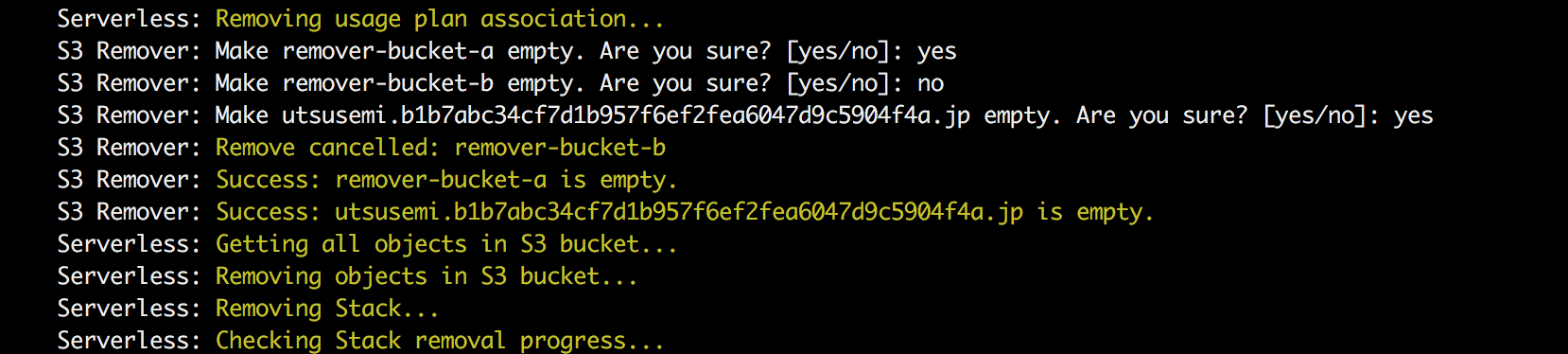
Populating the configuration object before using it
custom:
  boolean:
    true: true
    false: false
  remover:
    prompt: ${self:custom.boolean.${opt:s3-remover-prompt, 'true'}}
I can use the command line argument --s3-remover-prompt false to disable the prompt feature.