

Developing AWS Lambda functions with Python is awesome because this is a powerful programming language, but the tears start coming when we start dealing with dependencies.
In this article you will learn how to handle and win the battle against the Python dependencies when you deploy your Lambda functions to AWS using the Serverless Framework.
When we refer to “dependencies” we are talking about those libraries that are not available in the AWS Python Lambda runtime, for example “jsonpath_rw”
First of all we need to clarify that the methodology described in this article is not a “silver bullet” to manage dependencies (but an easy one). We recommend reading the following official dependencies management that can be useful.
- Severless Framework: https://serverless.com/blog/serverless-python-packaging/
- AWS: https://docs.aws.amazon.com/lambda/latest/dg/lambda-python-how-to-create-deployment-package.html
Remember that all the source code we use in this article will be available in github.
OK folks, let’s get down to code 💻
Let’s begin creating our sample project called “test-dependencies”
sls create --template aws-python3 --name test-dependencies --path test-dependenciescd test-dependencies
Now clean up the “serverless.yml” file to looks like the following
service: test-dependenciesprovider:
  name: aws
  runtime: python3.7functions:
  hello:
    handler: src/handler.hello
As shown above we will work with our simple test function called “hello” located inside the folder “src” where our python code will be grouped.
And the code of the “src/handler.py” function will be the following
import json
import sysdef hello(event, context):
    body = {
        "message": "Python Function executed successfully!"
    }
    response = {
        "statusCode": 200,
        "body": json.dumps(body)
    }
    return response
Time to deploy 🚀
sls deploy
and test our function ⚡️
sls invoke -f hello
This will be the output

It’s time to start breaking 💣 things and add some libraries to our python code. In the “src/handler.py” lets import “jsonpath_rw”
import json
import sys
sys.path.insert(0, 'src/vendor')
from jsonpath_rw import jsonpath, parse
def hello(event, context):
    body = {
        "message": "Python Function executed successfully!"
    }
    jsonpath.auto_id_field = 'id'
    data = [match.value for match in parse('foo[*].id').find({'foo': [{'id': 'bizzle'}, {'baz': 3}]})]
    response = {
        "statusCode": 200,
        "body": json.dumps(body),
        "data": json.dumps(data)
    }
    return response
And deploy again 🚀
sls deploy
and test the function again ⚡️
sls invoke -f hello
Now we got an error (expected behavior ) indicating that the library could not be imported 😱

Don’t worry, here comes the fun. We will use an interesting feature of the “pip” package manager for Python.
Create a file called “aws_requirements.txt” with the following content
jsonpath_rw==1.4.0
NOTE: use the version of the library you need for your project.
and Execute this magic pip command:
pip install -t src/vendor -r aws_requirements.txt
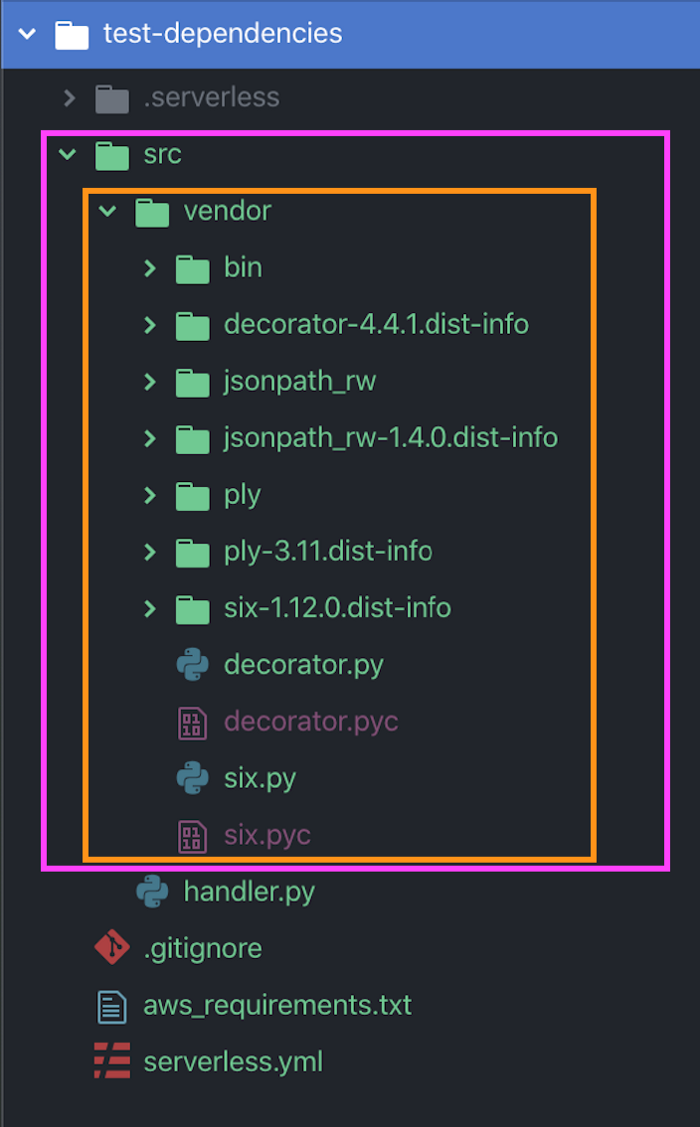
This will create a beautiful “vendor” folder inside “src” with dependencies within it.
And deploy again 🚀
sls deploy
and test the function again ⚡️
sls invoke -f hello
This would be the output

🎉 Amazing 🎉 we did it, we executed a Lambda function in AWS with dependencies nice and easy.
Conclusions
Using the pip command with the -t flag allowed us to download dependencies (indicated in the file “aws_requirements.txt”) and encapsulated them into the “src/vendor” folder.
Inside our Python code we need to expand the execution context of our function to allow us to import the library “jsonpath_rw” with
import sys
sys.path.insert(0, 'src/vendor')
from jsonpath_rw import jsonpath, parse
This methodology is easy to understand and pretty straightforward to implement.